

How to Plan Seasonal Google Ads Like a Pro
Why Seasonal Timing Can Make or Break Your Google Ads Results
Google Ads for seasonal campaigns is one of the highest-leverage skills in paid search — and most businesses get it wrong by starting too late.
Here’s the quick answer if you need it fast:
How to plan Google Ads for seasonal campaigns:
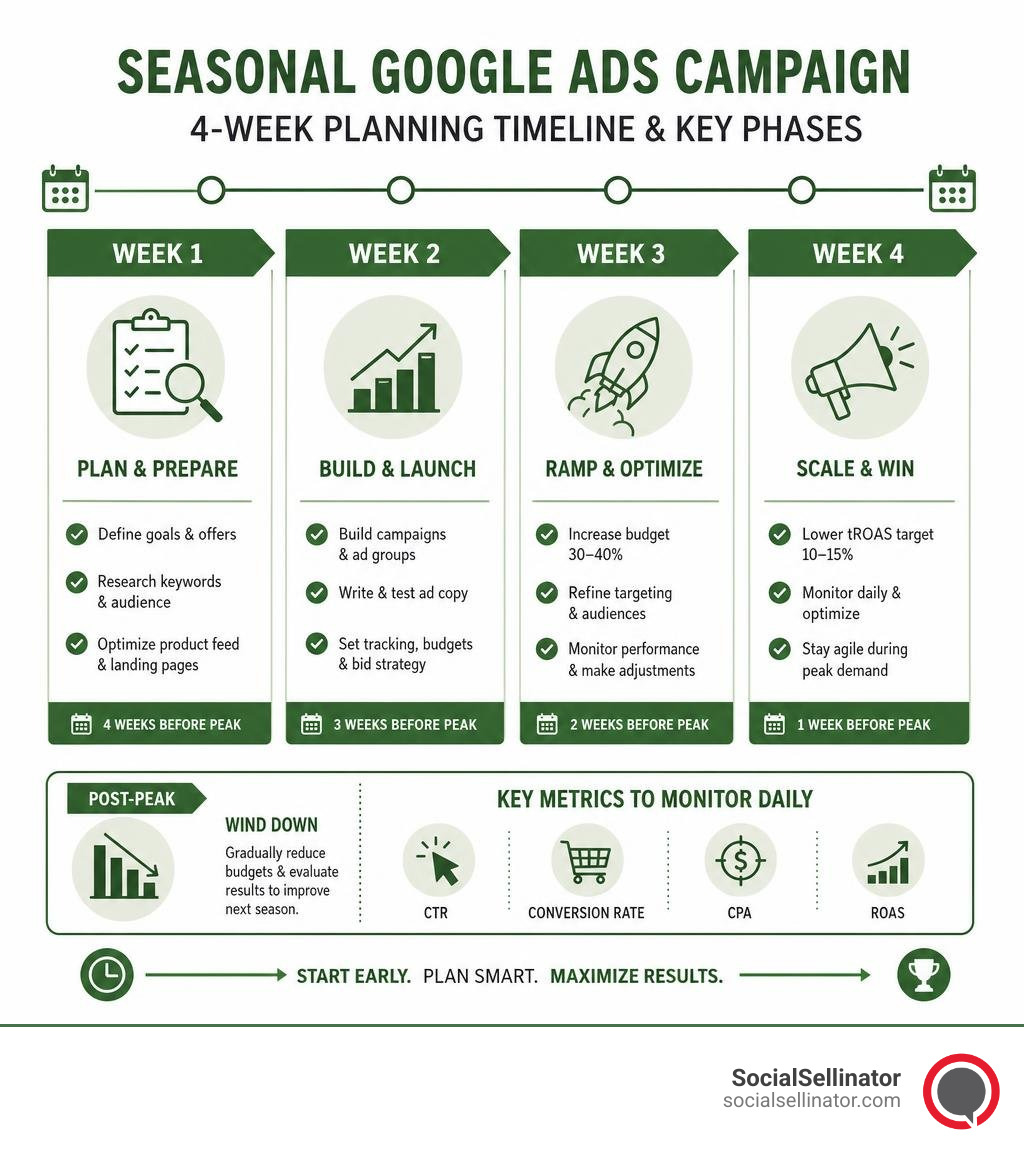
- Start 4-6 weeks before your peak — give Smart Bidding time to learn before the rush hits
- Ramp budgets gradually — increase spend by 30-40% per week to avoid triggering the learning phase
- Use Seasonality Adjustments for short spikes (1-7 days), and separate campaigns for longer promotions
- Lower your tROAS target by 10-15% during peak periods so you stay competitive in crowded auctions
- Optimize your product feed and ad copy before the season starts, not during it
- Monitor CTR, conversion rate, CPA, and ROAS daily during peak windows
- Wind down budgets gradually post-peak — sudden cuts hurt your bidding model just as much as sudden increases
The stakes are real. According to Google, 34% of shoppers start their holiday shopping as early as July. And last year, Google reported that eight days in December actually outpaced Cyber Monday in total consumer spending. That means the window for capturing seasonal demand is both wider and more competitive than most advertisers assume.
The problem? Most businesses treat seasonal campaigns like a light switch — flipping spend on a week before Black Friday and off the day after. That approach wastes budget, destabilizes Smart Bidding, and leaves revenue on the table.
This guide walks you through exactly how to plan, structure, and optimize your Google Ads for every phase of the seasonal cycle — from early planning through post-peak wind-down.
Google ads for seasonal campaigns terms to learn:
Strategic Planning and Timeline for Google Ads for Seasonal Campaigns
The secret to winning at seasonal paid search isn’t what you do during the peak week; it is what you do in the weeks leading up to it. If you are launching campaigns while your competitors are already collecting high-intent conversion data, you are playing a losing game of catch-up.
To build a robust foundation, you need a structured timeline that coordinates your budget, keyword strategy, and creative assets. Utilizing a comprehensive Google Ads Strategy Template can help you map out these moving pieces before you spend a single dollar.
When to Start Your Google Ads for Seasonal Campaigns
As we sit in July 2026, smart brands are already launching their initial Q4 holiday frameworks. While it might feel strange to talk about winter holidays in the heat of summer, consumer behavior data shows that early research is a massive driver of final purchase decisions.
Consider these critical statistics from recent holiday shopping cycles:
- 34% of shoppers start their holiday shopping as early as July.
- In early October, 58% of consumers state they plan their shopping well in advance, specifically mapping out purchases around major promotional days.
- From October through January, nearly 75% of purchases are heavily researched beforehand, with roughly 25% of shoppers conducting “a lot of research” before pulling the trigger.
- 59% of holiday shoppers already know exactly what gifts they will be buying by the time December arrives.
This means that if you wait until November to launch your holiday campaigns, you have missed the entire research phase. Shoppers who are looking for ideas, comparing prices, and building their gift lists will find your competitors instead of you.
Starting early allows you to capture this top-of-funnel research volume when click prices are relatively low. You can build highly qualified remarketing lists, establish domain authority, and allow Google’s machine learning models to gather baseline performance data before competition drives up cost-per-click (CPC) rates.
Managing the Ramp-Up and Wind-Down Phases
One of the most common mistakes in managing google ads for seasonal campaigns is shifting budgets too abruptly. Let’s say you have an evergreen campaign running at $200 per day, and you suddenly increase the budget to $2,000 per day on the morning of Black Friday.
What happens? You instantly throw the campaign into the “Learning Phase.”
When Google’s Smart Bidding algorithms encounter sudden, massive changes in budget or target metrics, they pause normal optimization to recalibrate. Consequently, your campaign spends its peak-week budget in an unstable, uncalibrated state, resulting in highly inefficient spend.
To avoid this bottleneck, we recommend a gradual 4-week ramp-up window:
- Four Weeks Out: Increase your daily budget by 15% to 20%. This minor adjustment is small enough to keep the bidding algorithm stable while signaling that more volume is coming.
- Three Weeks Out: Increase the budget by another 30%. Begin updating your creative assets in the background, submitting them early so they pass the ad approval process ahead of time.
- Two Weeks Out: Scale your budget by another 30% to 40%. At this stage, your campaign should be running at roughly 75% of its target peak capacity, building strong momentum.
- One Week Out: Reach your full peak budget. Because you scaled incrementally, your campaign remains fully calibrated, stable, and ready to capture peak traffic efficiently.
The same rule applies to the post-peak period. Cutting your budget in half overnight after a major sale can disrupt your bidding models. Mirror your ramp-up process in reverse, gradually winding down your budgets over a 2-to-3-week period to transition back to your baseline evergreen settings smoothly.
Budget Forecasting and Smart Bidding Adjustments

Predicting how much budget to allocate—and how to bid that budget—requires a balance of historical data and automated bidding features. During high-volume periods, relying solely on manual bidding is incredibly risky. Conversely, letting standard Smart Bidding run without manual guardrails can lead to missed opportunities when conversion rates spike rapidly.
To navigate this balance, you must understand when to let Google’s automation run free and when to guide it using advanced tools like Seasonality Adjustments.
| Feature / Strategy | Seasonality Adjustments | New Seasonal Campaigns |
|---|---|---|
| Best Used For | Short-term spikes (1-7 days) like flash sales or holiday weekends | Extended seasonal promotions (2+ weeks) requiring unique budgets |
| Bidding Impact | Informs Smart Bidding of a temporary, expected conversion rate spike | Builds a separate bidding history specifically for the promotional offer |
| Setup Time | Fast (applied directly to existing active campaigns) | Moderate to High (requires building new ad groups, copy, and keywords) |
| Learning Phase | Avoids resetting the learning phase of your core campaigns | Will trigger an initial learning phase for the new campaign |
| Post-Event Action | Automatically expires; campaign returns to baseline bidding | Must be manually paused or transitioned to a low-spend idle state |
Leveraging Google Ads Seasonality Adjustments
Google’s Smart Bidding is highly effective at managing standard, predictable seasonal trends over time. However, it cannot anticipate sudden, short-term spikes in conversion rates—such as a 48-hour flash sale or a highly publicized holiday weekend promotion.
This is where the Seasonality Adjustments tool becomes invaluable. This feature allows you to explicitly tell Google’s bidding algorithm to expect a specific percentage change in conversion rate over a designated window.
For example, if you are running a 3-day sale and your historical data indicates that your conversion rate typically jumps by 50% during this event, you can apply a +50% conversion rate modifier. Smart Bidding will immediately adjust its bids upward to capture that high-intent traffic, rather than waiting for post-click data to trickle in.
Best Practices for Seasonality Adjustments:
- Keep it short: This tool is optimized for short-term events lasting 1 to 7 days. It is not designed for extended campaigns; using it for periods longer than 14 days can degrade bid strategy performance.
- Use precise calculations: Look at your year-over-year data to estimate your expected conversion rate increase. Do not guess; an overstated modifier can lead to overbidding and wasted spend.
- Understand compatibility: Seasonality adjustments are supported in Search, Standard Shopping, Display, Performance Max, and App campaigns. They are not supported in Travel campaigns.
Adjusting CPA and ROAS Targets for Peak Seasons
During major shopping events like Black Friday or Cyber Monday, competitor activity reaches a fever pitch. As hundreds of advertisers flood the auction, cost-per-click (CPC) rates naturally rise.
If you keep your Target ROAS (tROAS) or Target CPA (tCPA) constraints strictly at their baseline evergreen levels, your campaigns may drop out of valuable auctions. Because the algorithm is trying to maintain your strict efficiency targets in a high-CPC environment, it will choke your campaign’s reach precisely when consumer buying intent is at its highest.
To maximize your volume and visibility, you must make your bid strategies more flexible:
- Lower your tROAS targets by 10% to 15%: If your baseline target is 400%, lower it to 340% or 350% during the peak week. This gives the algorithm permission to bid more aggressively to win high-value auctions.
- Raise your tCPA targets: If you use a cost-per-acquisition model, increase your target CPA to accommodate the higher CPCs.
- Focus on total volume: While your individual transaction efficiency (ROAS) might drop slightly, your total conversion volume and overall revenue will typically increase significantly, yielding a higher net profit.
To implement these adjustments effectively, it is helpful to review your historical performance using specialized Google Ads Bid Strategies to identify the exact tipping points where bid adjustments yield the highest returns.
Campaign Structure: New Campaigns vs. Seasonality Adjustments
One of the most debated questions in paid search is whether you should build entirely new campaigns for seasonal events or simply adapt your existing evergreen campaigns. The answer depends on the duration of your promotion and your structural requirements.
If you are running a short-term promotional event (such as a 4-day Memorial Day weekend sale), building a brand-new campaign is often counterproductive. By the time the new campaign passes the approval process and exits its initial learning phase, the sale is already over. For these short windows, keeping your evergreen campaigns active and applying a Seasonality Adjustment is the most efficient approach.
However, for extended seasonal periods—such as a 6-week holiday gift campaign—creating a separate, dedicated campaign is highly recommended. This structural separation offers several key benefits:
- Dedicated Budget Control: You can allocate a specific seasonal budget without pulling funds away from your core, year-round revenue-generating products.
- Custom Ad Copy and Landing Pages: You can tailor your headlines, descriptions, and landing pages specifically to the holiday or promotional theme.
- Year-Over-Year Reusability: At the end of the season, you can simply pause the campaign. Next year, you can reactivate it, preserving its historical performance data and structure.
To ensure your account remains clean and easy to manage throughout these transitions, applying consistent Google Ads Optimization strategies is essential for preventing overlapping targeting and wasted spend.
Structuring Keywords and Negative Lists for Google Ads for Seasonal Campaigns
When structuring keywords for google ads for seasonal campaigns, you must account for dramatic shifts in user search behavior. During peak seasons, generic search terms often spike in volume, while intent shifts from research to immediate purchasing.
To capture this traffic without wasting budget, follow this structured approach:
- Leverage Google Trends: Analyze historical search trends to identify exactly when interest begins to rise for specific seasonal terms. This helps you time your keyword activation perfectly.
- Beware of “Keyword Unicorns”: These are search terms that appear to have incredibly high volume relative to similar terms but have actually experienced a massive drop in recent demand. Always verify recent search volume trends rather than relying solely on multi-year averages.
- Build Dedicated Promotional Ad Groups: Within your seasonal campaigns, create highly specific ad groups centered around promotional keywords (e.g., “Black Friday jewelry deals” or “Christmas gift ideas for mom”).
- Use Negative Keywords Aggressively: Seasonal traffic brings a massive wave of irrelevant search queries. Review your search term reports daily during peak periods. Add negative keywords for terms that indicate low purchase intent, out-of-stock items, or unrelated holiday queries (e.g., “free,” “DIY,” or “jobs”).
Creative Optimization and AI-Driven Tools
With your budget and campaign structure in place, the focus shifts to your creative assets. In a crowded seasonal auction, your ad copy and visuals must work twice as hard to capture user attention and drive clicks.
Fortunately, Google’s modern AI tools make it easier than ever to scale your creative production and tailor your messaging to seasonal audiences in real time.
Crafting High-Conversion Seasonal Ad Copy
Your seasonal ad copy should focus heavily on two psychological triggers: urgency and relevance. Shoppers are actively looking for deals, and they want to know exactly what you are offering and how long they have to get it.
- Incorporate Event-Specific Hooks: Use headlines that clearly state the promotion (e.g., “Save 30% on Father’s Day Gifts” or “Limited-Time Christmas Sale”).
- Leverage Countdown Customizers: Use Google’s dynamic countdown feature in your headlines (e.g., “Sale Ends in
{=COUNTDOWN("2026/11/30 23:59:59")}Days!”). This automatically updates your ad copy in real time, creating a powerful sense of FOMO (fear of missing out). - Utilize Promotion Assets: These extensions display special deals directly beneath your search ads, making them highly visible—especially on mobile devices. Ensure you specify exact percentage or dollar-off discounts, and keep any conditional text short and readable.
- Avoid Editing Active Ads: If you need to make a last-minute copy change to an active ad, do not edit the existing text. Editing triggers a new review process, which can pause your ad’s delivery during a critical sales window. Instead, create a new ad containing the updated copy and run it alongside the old one. Once the new ad is approved, you can pause the original.
To streamline this process, you can build out your messaging frameworks ahead of time using structured Google Ads Copy Templates to ensure all character limits and compliance standards are met.
Utilizing Performance Max and Shopping Ads
For e-commerce brands, the combination of Performance Max (PMax) and Shopping Ads—often referred to as the “Ads Power Pair”—is the engine that drives seasonal sales. PMax leverages Google’s advanced machine learning to dynamically optimize your budget and placements across Search, YouTube, Display, Discover, and Gmail simultaneously.
To maximize the performance of your Shopping and PMax campaigns during seasonal peaks, prioritize these optimization steps:
- Optimize Your Product Feed: Your feed is the foundation of your Shopping performance. Ensure your product titles and descriptions include highly relevant seasonal keywords (e.g., adding “Gift Box” or “Stocking Stuffer” where appropriate).
- Verify Price Attributes: Double-check that your
[price]and[sale_price]attributes are correctly mapped and updated in Google Merchant Center. Accurate pricing is critical for winning the Shopping auction and displaying the highly attractive “Sale” badge on your listings. - Leverage Product Studio: This AI-powered tool within Merchant Center Next allows you to instantly update your product imagery. You can use AI to swap out standard, plain backgrounds with festive holiday scenes, giving your products a seasonal look without the expense of a professional photoshoot.
- Customize Asset Groups: Within your PMax campaigns, build dedicated asset groups for your seasonal promotions. Populate these groups with holiday-specific images, videos, headlines, and audience signals (such as Customer Match lists of past holiday shoppers) to guide Google’s machine learning model toward your highest-value prospects.
Frequently Asked Questions About Seasonal Google Ads
Should I pause my seasonal campaigns during the off-season?
If your off-season is relatively short (less than 4 to 6 weeks), we strongly recommend idling your campaigns at a reduced budget (20% to 30% of peak spend) rather than pausing them entirely.
Smart Bidding models rely on consistent, fresh conversion data to maintain their learning. If you pause a campaign for more than 3 to 4 weeks, the algorithm loses a significant portion of its accumulated learning history. When you reactivate the campaign, it must rebuild its optimization model from scratch, leading to initial performance volatility. Keeping the campaign running at a low baseline budget preserves this valuable historical data, making it much cheaper and more effective to scale back up when the next peak arrives.
If your off-season is longer than 2 months (for example, a pool installation business during winter), you should pause the campaigns to avoid wasting budget on non-converting traffic. However, never delete the campaigns. Pausing them allows you to preserve the structural settings and historical year-over-year performance data, which you can leverage as a reference point for the following season.
What is the new Google Ads Promotion Mode?
Google Ads has been testing a powerful budgeting toolset known as Promotion Mode (or the “Sales & Promotions Feature Bundle with Flighted Budgets”). This feature is designed specifically for short-term, high-intensity promotional windows where maximizing volume is more critical than maintaining strict efficiency.
Unlike standard Smart Bidding, which prioritizes long-term ROI stability, Promotion Mode allows you to:
- Activate Accelerated Budget Pacing: This switch temporarily bypasses standard daily spend limits to deliver your budget rapidly over a short 3-to-14-day window.
- Set Campaign Total Budgets: You can define a fixed budget for a specific promotional flight (e.g., a 4-day Black Friday weekend), allowing Google to pace your spend evenly across that exact period.
- Prioritize Scale Over Efficiency: It explicitly tempers efficiency constraints to maximize visibility and conversion volume during your most critical sales windows.
Note: You should avoid using Promotion Mode for always-on, year-round campaigns or if your primary objective is maintaining strict, tight ROAS targets.
How do I prevent billing issues from stopping my seasonal ads?
There is nothing worse than having your campaigns abruptly halt in the middle of a peak sales day because of a declined payment or a budget threshold issue. Because seasonal campaigns involve rapid, high-volume spending, they frequently trigger fraud alerts or credit limit caps from banks.
To safeguard your campaigns against billing disruptions:
- Set Up a Backup Payment Method: Always link a secondary credit card to your Google Ads billing profile. If your primary payment method is declined for any reason, Google will automatically charge the backup, keeping your ads running without interruption.
- Initiate Bank Transfers Early: If your account is set up for manual prepayments via bank transfer, keep in mind that these transfers can take up to two weeks to clear in Google Ads. Ensure you initiate any manual funding well ahead of your campaign start dates.
- Monitor Account Budgets: If you use monthly invoicing or account-level budgets, verify that your active budget caps are set high enough to accommodate your projected seasonal spend increases.
Conclusion
Mastering google ads for seasonal campaigns requires moving away from “set-it-and-forget-it” configurations and adopting a proactive, structured approach. By planning your campaigns 4 to 6 weeks in advance, gradually scaling your budgets, leveraging advanced automated features like Seasonality Adjustments, and optimizing your creative assets with AI-driven tools, you can capture peak consumer demand efficiently without destabilizing your account’s performance.
Managing the complexities of real-time bidding, budget pacing, and creative optimization during high-stakes seasonal peaks can be incredibly demanding. If you are ready to take the guesswork out of your seasonal paid search strategy and drive measurable, high-impact results, partner with the experienced team at SocialSellinator. Explore our comprehensive Google Advertising Services to learn how we can help you maximize your return on investment and grow your business year-round.
Headquartered in San Jose, in the heart of Silicon Valley and the San Francisco Bay Area, SocialSellinator proudly provides top-tier digital marketing, SEO, PPC, social media management, and content creation services to B2B and B2C SMB companies. While serving businesses across the U.S., SocialSellinator specializes in supporting clients in key cities, including Austin, Boston, Charlotte, Chicago, Dallas, Denver, Kansas City, Los Angeles, New York, Portland, San Diego, San Francisco, and Washington, D.C.