

Add to Cart: How to Master Google Shopping Ads Without Losing Your Mind
What Google Ads Shopping Campaigns Actually Are (And Why They Matter)
Alt-text: Digital retail display showcasing Google Shopping ad placements. Metadata: 1920x1080px, PNG, high-resolution.
In the hyper-competitive landscape of 2026 e-commerce, google ads shopping campaigns are the definitive bridge between consumer intent and retailer inventory. At SocialSellinator, we see these ads as a visual-first experience, allowing shoppers to see products, prices, and availability before clicking. This transparency acts as a powerful filtering mechanism, ensuring site traffic is highly qualified and ready to convert. In an era of short attention spans, presenting a high-resolution image alongside a competitive price is one of the most effective ways to capture interest in the initial micro-moment of a search. These campaigns have evolved from simple product listings into sophisticated, AI-driven tools that predict consumer behavior and place products exactly where they are most likely to be purchased. By integrating these campaigns into a broader digital marketing strategy, businesses can ensure they are meeting customers at every stage of the funnel, from initial discovery to the final click.
For modern retailers, these campaigns are essential. Whether you are a boutique in San Jose or a national brand in New York, showcasing products directly within Google Search results is a game-changer. These ads appear across the Shopping tab, Google Images, YouTube, and Gmail, helping brands remain visible throughout the customer journey. By leveraging SocialSellinator’s expertise in digital marketing, SEO, and PPC, businesses can optimize listings to improve performance in every placement. The visual nature of these ads creates a psychological shortcut, reducing friction between discovery and purchase. When a user sees a product that matches their aesthetic and budget immediately, the cognitive load of searching is reduced, leading to a much higher probability of a sale. This is why SocialSellinator focuses on the intersection of data accuracy and visual appeal to drive results for our clients. Furthermore, the ability to display multiple products from the same brand simultaneously allows for a “digital storefront” effect that traditional text ads simply cannot replicate. This increased real estate on the search engine results page (SERP) builds brand authority and trust, which are critical components for conversion in a crowded marketplace.
| Element | What It Means |
|---|---|
| Ad Format | Visual product listings (image, title, price, store name) |
| Targeting Method | Based on your product feed data, not keywords |
| Where Ads Appear | Google Search, Shopping tab, Images, YouTube, Gmail, Maps |
| How You Pay | Cost-per-click (CPC) – only when someone clicks |
| Campaign Types | Standard Shopping or Performance Max |
| Starting Point | Google Merchant Center + linked Google Ads account |
Setting up these campaigns requires strategic data management. It is not enough to simply upload products; you need a robust feed, clear profit margins, and a bidding strategy aligned with business goals. When executed properly, google ads shopping campaigns can drive lower customer acquisition costs and stronger return on ad spend (ROAS). This guide explores the technical and strategic layers required to master this platform and scale your retail business effectively. We will delve into the nuances of feed optimization, the shift toward automated bidding, and how to structure your account for maximum visibility and profitability in a crowded digital marketplace. Success in this arena requires a commitment to data hygiene and a willingness to adapt to the ever-changing algorithms that govern digital commerce.
The Core Mechanics of Google Ads Shopping Campaigns
To master google ads shopping campaigns, you must understand that the system operates on a different logic than traditional search advertising. In standard search, you bid on keywords; in Shopping, you bid on products. Google uses your product feed data to determine relevance. At SocialSellinator, we emphasize that your product feed is the foundation of your PPC strategy. If the foundation is weak, the campaign will struggle to achieve a positive ROI. The algorithm acts as a matchmaker, scanning thousands of data points to find the perfect product for a specific query. This means your data must be cleaner and more descriptive than ever before. The feed acts as the “DNA” of your campaign, containing every detail from the material of a shirt to the voltage of a power tool. Without this granular information, the AI cannot effectively place your ads in front of the right audience.
When a user searches for “waterproof hiking boots,” Google scans your feed for attributes like title, description, and google_product_category. If your data matches the intent, your ad enters the auction. This automated matching process allows Google to find customers searching for specific long-tail terms you might miss in a traditional keyword list, broadening reach while maintaining relevance. For instance, a user might search for “size 10 brown leather waterproof boots for men,” and because your feed contains all those attributes, your product appears. This level of specificity is what makes Shopping ads so potent for conversion. It removes the guesswork from keyword research and allows the product’s own attributes to drive the targeting. This is particularly beneficial for retailers with large, diverse catalogs where manual keyword management would be impossible.
A critical component is the merchant_id, which links your Google Merchant Center to your Google Ads account. Ensuring this connection is stable and that data refreshes daily is the first step in a successful PPC strategy. Compliance with Google’s policies is also vital; discrepancies in pricing or availability can lead to immediate product disapprovals, halting sales momentum. SocialSellinator provides comprehensive audits to ensure that your technical setup is flawless, preventing costly downtime and ensuring your products are always visible to potential buyers. We also look at the health of your website’s structured data, as Google often crawls your site to verify the information provided in the feed. If your website says a product is $50 but your feed says $45, your ad will be paused to protect the user experience.
How Shopping Ads Differ from Search Ads
A search ad is a promise; a Shopping ad is proof. By showing the image and price upfront, you provide the two most important pieces of information for a decision. This leads to higher intent among those who click. If a shopper sees a price outside their budget, they won’t click, saving you from wasting spend on users who won’t convert. This pre-qualification filters out window shoppers and focuses your budget on serious buyers. In traditional search, a user might click a text ad only to find the product is too expensive or not the right style. Shopping ads eliminate this waste by providing visual and financial context before the click occurs. This efficiency is why many e-commerce brands allocate the majority of their budget to Shopping rather than traditional Search.
Furthermore, Shopping ads allow for a broader presence. Google often displays multiple products from the same merchant for one query. Your Shopping ad might even appear alongside your text ad, doubling your real estate. This visibility establishes authority and brand dominance. When a consumer sees your brand multiple times on a single search results page, it builds trust and increases the likelihood of a click. SocialSellinator helps brands maximize this “shelf space” to ensure they are the first choice for consumers in their niche. By dominating the SERP, you not only increase your own chances of a sale but also push competitors further down the page, creating a significant competitive advantage.
Key Benefits for Modern Retailers
- Enhanced Click-Through Rates (CTR): Visual ads consistently outperform text ads for product searches because they provide immediate gratification to the user’s visual search intent. The human brain processes images much faster than text, making these ads naturally more engaging.
- Superior Lead Quality: Transparent pricing means users who click are further along in the decision process, having already accepted the price point and visual style of the item. This leads to a higher conversion rate once the user lands on your site.
- Automated Reach: Machine learning identifies niche search terms relevant to your products, often uncovering high-converting queries that a human manager might not have considered. This allows for continuous discovery of new customer segments.
- Data-Driven Insights: Reporting shows which specific SKUs drive revenue, allowing for smarter inventory decisions and more effective budget allocation across your entire product catalog. You can see exactly which colors, sizes, or styles are trending in real-time.
Prerequisites: Setting Up Your Merchant Center and Product Feed
Before launching google ads shopping campaigns, you must establish a foundation in Google Merchant Center (GMC). GMC is the digital warehouse for your product information, managing inventory, shipping, and tax settings. Setup involves verifying website ownership and ensuring business information is compliant with Google’s retail policies. This stage is where many retailers stumble due to Google’s stringent data accuracy requirements. A single error in your shipping settings or a missing tax table can lead to a full account suspension, which is why SocialSellinator takes a meticulous approach to the initial setup phase. We ensure that every technical requirement is met before a single dollar is spent on advertising.
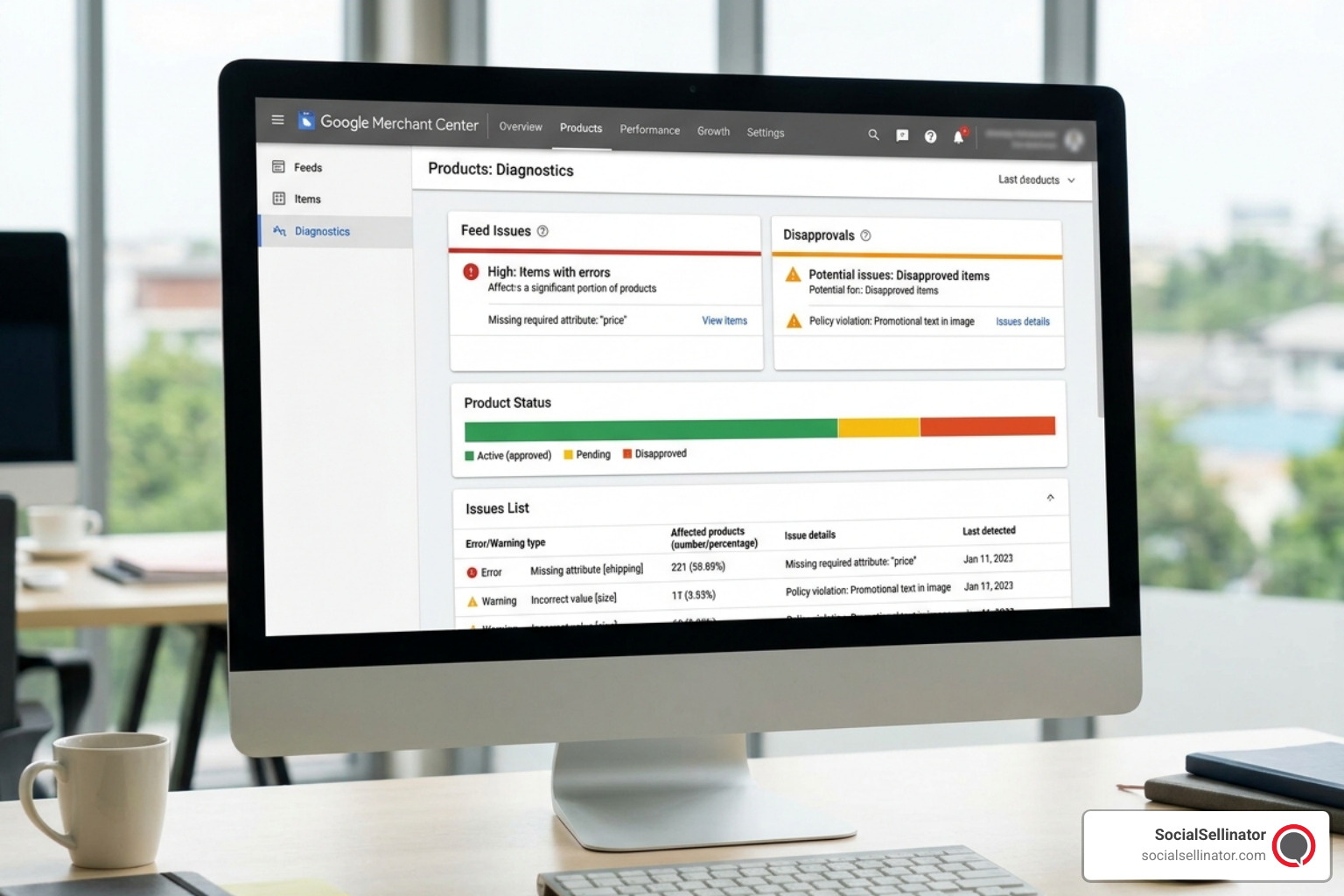 Alt-text: Google Merchant Center interface displaying product feed diagnostics. Metadata: 1200x800px, JPEG, optimized for web.
Once the account is established, link your GMC to your Google Ads account using your merchant_id. SocialSellinator recommends auditing your website’s checkout process to ensure it aligns with the data sent to Google. Even small discrepancies can result in disapproved products. For example, if your website adds a hidden handling fee that isn’t reflected in the GMC shipping settings, Google will flag this as a policy violation. Consistency across all touchpoints is the key to maintaining a healthy account and ensuring your ads continue to serve without interruption. This includes ensuring that your return policy is clearly stated and matches the information provided to Google, as transparency is a major factor in Google’s trust algorithm.
Optimizing Your Feed for google ads shopping campaigns
Your product feed is the lifeblood of your advertising. Focus on the “Big Four” attributes to ensure maximum visibility and relevance:
- Product Titles: The most important factor for relevancy. Use a logical hierarchy: [Brand] + [Gender/Category] + [Product Name] + [Color/Material] + [Size]. Avoid promotional text like “Free Shipping” or “Best Seller,” as these can lead to disapprovals. A well-structured title helps Google’s algorithm understand exactly what you are selling and who should see it. For example, “Nike Men’s Air Max 270 Running Shoes – Black/White – Size 10” is far more effective than just “Nike Running Shoes.”
- GTINs (Global Trade Item Numbers): Unique identifiers like UPC codes. Products with valid GTINs get priority in the auction because Google can verify their authenticity and compare them against other retailers. This data helps Google group similar products and provide a better user experience. If you manufacture your own products, you must obtain official GTINs to compete effectively.
- High-Quality Imagery: Use high-resolution photos on a clean, white background. Avoid watermarks, promotional overlays, or cluttered backgrounds, which lead to disapproval. The image is the first thing a customer sees; it must be professional and accurately represent the product. We recommend using multiple images, including lifestyle shots, to give the user a better sense of the product’s scale and use.
- Product Descriptions: These are indexed by Google and used to determine search relevance. Include technical specifications, secondary keywords, and detailed product features to support broader PPC performance. While users may not always read the full description, the algorithm uses it to map your product to complex search queries. Avoid keyword stuffing and focus on providing genuine value to the reader.
Common Feed Issues and How to Fix Them
The most common issue is “Price Mismatch,” occurring when the feed price doesn’t match the landing page. Use automatic item updates in GMC to allow Google to crawl your site and update pricing in real-time. Another frequent issue is “Missing Attributes,” especially for apparel where size, color, and age group are mandatory. Regular PPC audits are essential to catch these errors before they impact your bottom line. SocialSellinator often uses supplemental feeds to quickly patch missing data or test new product titles without altering the primary feed, allowing for agile optimization and faster results. These supplemental feeds are a powerful tool for running seasonal promotions or testing different messaging strategies without risking the stability of your main data source.
Strategic Structure: Standard Shopping vs. Performance Max
In 2026, choosing between Standard Shopping and Performance Max (PMax) is a critical decision for your google ads shopping campaigns. Both utilize your product feed but offer different levels of control and automation. SocialSellinator often recommends a hybrid approach: Standard Shopping for core products where control is paramount, and PMax for broader discovery and leveraging Google’s full network. Understanding the strengths and weaknesses of each format is essential for building a balanced and profitable advertising portfolio. As the digital landscape becomes more automated, the ability to strategically deploy these different campaign types becomes a major differentiator for successful brands.
Standard Shopping offers granular control that many experienced marketers prefer. You can set manual bids, review exact search terms, and add negative keywords to prevent wasted spend. This is preferred for advertisers who want tighter control over where their money is going and have a strong understanding of their customers’ search behavior. It allows you to see exactly which search terms triggered your ads, providing invaluable data for your SEO and content strategies. If you have a specific product line with very tight margins, Standard Shopping allows you to micromanage the bids to ensure profitability. It also provides the transparency needed to identify exactly which products are driving traffic but failing to convert, allowing for more targeted website optimizations.
Performance Max is Google’s fully automated solution, serving ads across Search, YouTube, Display, Discover, Gmail, and Maps. PMax uses machine learning to find conversions wherever they may be, often reaching audiences that Standard Shopping might miss. Success in PMax lies in “Asset Groups,” where you provide high-quality headlines, descriptions, images, and videos for Google to mix and match. While you lose some control over search terms, you gain the power of Google’s predictive algorithms, which can identify potential buyers based on their browsing history and intent signals across all Google properties. This cross-channel approach is vital for capturing the modern consumer, who often interacts with a brand multiple times across different platforms before making a purchase.
Understanding Campaign Priorities
In Standard Shopping, Campaign Priority (High, Medium, Low) controls which campaign bids on a product when it is included in multiple campaigns. This system enables a strategy known as “query sculpting.” For example, a High priority campaign with low bids can catch broad, generic searches, while a Low priority campaign with higher bids captures specific, high-intent brand searches. This ensures you aren’t overpaying for generic traffic while still being aggressive on the searches most likely to convert. SocialSellinator uses this advanced technique to maximize the efficiency of every dollar spent. By carefully managing these priorities, we can ensure that your budget is always being used in the most impactful way possible, regardless of the volume of searches.
Organizing Product Groups with Custom Labels
Don’t treat all products equally. Use Custom Labels (0-4) to group inventory by business-critical attributes, allowing you to allocate more budget to your most profitable items. This segmentation is vital for scaling your google ads shopping campaigns effectively. Without proper segmentation, your best-selling items might be starved of budget by low-performing products that happen to have high search volume. Custom labels allow you to take control of your inventory and ensure that your marketing spend is aligned with your actual business outcomes.
Common uses for custom labels include:
- Profitability: Grouping by High vs. Low Margin to ensure your ROAS targets are met. This is the most common and often most effective use of labels.
- Seasonality: Tagging items like “Summer Collection” or “Holiday Specials” for easy budget adjustments. This allows for quick pivots as consumer demand shifts throughout the year.
- Performance: Moving top sellers into dedicated campaigns with higher budgets to maximize their reach. This “hero product” strategy is a proven way to drive consistent revenue.
- Clearance: Identifying old stock that needs to be moved quickly, perhaps with a more aggressive bidding strategy. This helps maintain healthy inventory turnover and cash flow.
Without custom labels, you risk bidding the same for a high-profit item as a low-profit one, leading to significant inefficiency. SocialSellinator works with clients to define these labels based on their unique business goals, ensuring that the advertising strategy aligns perfectly with their inventory management and financial objectives. This holistic approach ensures that your digital marketing efforts are supporting your overall business health, not just driving vanity metrics.
Advanced Optimization: Bidding and Negative Keyword Strategies
Once google ads shopping campaigns are live, the focus shifts to continuous optimization. In 2026, this involves a sophisticated blend of automated bidding and manual traffic sculpting. SocialSellinator’s process involves daily monitoring and weekly deep dives into performance metrics to identify growth opportunities and eliminate waste. The goal is to move beyond basic setup and into a cycle of constant improvement that drives long-term success. Optimization is not a one-time event; it is a continuous process of testing, learning, and refining based on real-world data.

Flawless conversion tracking is the absolute bedrock of optimization. You need to know not just that a click happened, but exactly which product was purchased and the total transaction value. Without this data, Google’s automation lacks the necessary signals to make informed bidding decisions. Using audience signals based on your existing customer data also helps the algorithm find “lookalike” audiences who share characteristics with your best customers. SocialSellinator ensures that your tracking pixels and server-side tagging are correctly implemented to provide the cleanest data possible to the AI. This high-quality data allows the machine learning models to work at peak efficiency, identifying the users most likely to provide a high lifetime value.
Choosing the Best Bidding Strategy
- Target ROAS (Return on Ad Spend): This is the gold standard for e-commerce. You set a specific revenue target for every dollar spent (e.g., 500% ROAS). It requires a steady stream of conversion data to work effectively, as the algorithm needs to learn which users are most likely to spend. This strategy is ideal for mature accounts with consistent sales volume. It allows you to focus on profitability rather than just raw sales numbers.
- Maximize Conversions: This strategy focuses on getting the highest number of sales possible within your daily budget. It is an excellent choice for clearing out inventory or for new accounts that are still gathering historical data. It prioritizes volume over a specific return target, making it useful for aggressive growth phases. However, it requires close monitoring to ensure that the cost-per-acquisition (CPA) remains within a sustainable range.
- Manual CPC with Enhanced CPC: This offers the most control for the advertiser. Enhanced CPC allows Google to slightly adjust your manual bids when it detects a click is particularly likely to convert. This is often the best starting point for new campaigns, allowing you to gather data and understand your baseline performance before handing the reins over to full automation. It provides a safety net while still allowing for some algorithmic optimization.
Mastering Negative Keywords
Negative keywords are essential for exclusion and budget protection. They prevent your ads from showing for searches that are irrelevant or unlikely to convert. If you sell premium, high-end furniture, you should add terms like “cheap,” “used,” “discount,” or “rental” to your negative keyword list. Reviewing your search term reports weekly is a non-negotiable task to identify high-spend, zero-conversion terms. This disciplined approach supports PPC efficiency and ensures your budget is reserved for high-intent users who are ready to buy. SocialSellinator maintains extensive master negative keyword lists to give our clients a head start in keeping their traffic clean and relevant. We also look for “cross-contamination” where generic terms are triggering ads for specific products, and use negative keywords to force the traffic into the correct, more relevant campaign.
Troubleshooting and Scaling Your Results in 2026
Performance in google ads shopping campaigns is rarely linear; it requires constant vigilance and a systematic approach to troubleshooting. When performance dips, the first place to look is the Merchant Center for product disapprovals or feed errors. Technical glitches on your website, such as changes to URL structures or server downtime, can cause Google to pause your ads instantly. SocialSellinator recommends setting up automated alerts in both GMC and Google Ads to notify you of critical issues the moment they occur, minimizing the impact on your sales. A proactive approach to technical health is the best way to ensure long-term stability and growth.
External factors also play a massive role in performance. Competitor pricing shifts, seasonal demand changes, and even broader economic trends can impact your CTR and conversion rates. You must stay agile with your budget allocation, shifting funds toward high-return products and pulling back on those that are underperforming. Scaling is not just about spending more money; it’s about spending smarter. When you find a product or category that is performing well, increase the budget gradually—usually by 10-20% every few days—to avoid sudden spikes in your cost-per-acquisition (CPA) and to allow the algorithm to adjust to the new spending level. Rapid budget increases can often “break” the learning phase of an automated bidding strategy, leading to a temporary drop in performance.
In 2026, retailers must also remain vigilant about click fraud and bot traffic. Monitoring for unusual traffic spikes or patterns of high clicks with zero engagement is essential for protecting your ROI. SocialSellinator regularly reviews geographic and placement reports to ensure that your clicks are coming from legitimate potential customers in your target markets. We also look at time-of-day and day-of-week performance to optimize bidding schedules, ensuring your ads are most prominent when your customers are most likely to be shopping. This level of detail ensures that every dollar of your budget is being used to reach real people with real intent.
Finally, it is important to remember that Shopping ads are part of a much larger digital ecosystem. The insights you gain from your Shopping campaigns should inform your SEO strategy and your product page optimization. If a specific product title or description performs exceptionally well in Shopping, you should align your organic pages with those terms to capture more free traffic. This integrated approach helps retailers build a stronger, more resilient performance across all digital channels. SocialSellinator specializes in this holistic strategy, ensuring that your digital marketing, SEO, PPC, and content efforts all work in perfect harmony to drive growth. By treating your product data as a strategic asset, you can turn Google Shopping into a predictable and scalable engine for your business. This synergy between paid and organic efforts is the hallmark of a truly mature digital marketing operation.
Frequently Asked Questions about Shopping Ads
How do campaign priorities work in Google Shopping?
Campaign priorities (High, Medium, Low) are a tool used to tell Google which campaign should take precedence when a single product is included in multiple campaigns. Google will always use the settings and budget of the High priority campaign first, regardless of the bid amount. This allows advertisers to create sophisticated structures where they use negative keywords to filter broad searches into one campaign and specific, high-value searches into another. It is a key component of “query sculpting,” which helps in managing how your budget is distributed across different types of search intent. This is particularly useful for separating brand traffic from generic traffic.
What is the main difference between Standard Shopping and PMax?
Standard Shopping is a more traditional format that offers manual control over bidding, search term monitoring, and negative keyword lists. It primarily appears on the Search and Shopping tabs. Performance Max (PMax), on the other hand, is an AI-driven campaign type that automates targeting and bidding across all of Google’s properties, including YouTube, Display, and Gmail. While Standard Shopping is best for those who want total control and transparency, PMax is designed to leverage Google’s machine learning to find conversions across a much wider audience. Many successful retailers now use a combination of both to maximize their reach and efficiency.
Why are my Shopping ads not showing up?
There are several common reasons why your ads might not be appearing. First, check the Google Merchant Center for any product disapprovals or account-level suspensions. Common issues include price mismatches, missing shipping data, or policy violations. Second, ensure your bids are competitive enough to enter the auction; if your bids are too low, Google won’t show your ads. Third, check your daily budget to see if it has been exhausted. Finally, ensure your product feed includes valid GTINs, as products without them are often deprioritized in the auction. SocialSellinator can help diagnose these issues quickly to get your ads back online and performing at their best.
Can I use Shopping ads to promote my services?
No, Google Shopping ads are strictly reserved for physical products that can be shipped to a customer. Services, digital downloads (in most cases), and non-tangible items are not eligible for this specific ad format. For service-based businesses, SocialSellinator recommends utilizing traditional Search ads, Display ads, or Local Services Ads, which are specifically designed to generate leads for service providers. We can help you determine the best ad format for your specific business model to ensure you are reaching the right audience with the right message.
How often should I be updating my product feed?
At a minimum, your product feed should be updated once every 24 hours to ensure that your pricing and availability are accurate. However, for high-volume stores with frequent inventory changes, updating multiple times a day via an API is highly recommended. Frequent updates prevent “Price Mismatch” errors and ensure that you aren’t paying for clicks on products that are out of stock. Maintaining a healthy, up-to-date feed is one of the most important tasks in managing successful google ads shopping campaigns. It ensures that the user experience remains positive and that your ad spend is never wasted on unavailable items.
What are Local Inventory Ads (LIAs)?
Local Inventory Ads are a subset of Shopping ads that show products available in a physical store near the user. When a shopper clicks an LIA, they are directed to a Google-hosted page for your store, called the local storefront. This page includes store hours, inventory levels, and directions. LIAs are a powerful tool for omnichannel retailers looking to drive foot traffic to their brick-and-mortar locations. They bridge the gap between online research and offline purchase, providing a seamless experience for the local shopper.
Conclusion
Mastering google ads shopping campaigns is a journey of technical refinement and strategic adaptation. In 2026, successful retailers treat their product data as a strategic asset, balancing the precision of manual control with the power of AI-driven automation. By focusing on feed health, smart campaign structure, and continuous optimization, you can turn Google Shopping into a scalable and highly profitable revenue driver for your business. The landscape is constantly changing, but the fundamentals of providing clear, visual, and relevant information to the consumer remain the same. As you continue to refine your approach, remember that the data you collect is your most valuable resource for future growth.
At SocialSellinator, we help businesses navigate these complexities to achieve measurable and sustainable growth. Whether you are overhauling an existing PPC strategy or launching your very first campaign, our team supports brands with a comprehensive suite of services including digital marketing, SEO, PPC, and content strategy. We are dedicated to improving performance across all channels and helping our clients dominate their market. Headquartered in San Jose, in the heart of Silicon Valley and the San Francisco Bay Area, SocialSellinator proudly provides top-tier digital marketing, SEO, PPC, social media management, and content creation services to B2B and B2C SMB companies. While serving businesses across the U.S., SocialSellinator specializes in supporting clients in key cities, including Austin, Boston, Charlotte, Chicago, Dallas, Denver, Kansas City, Los Angeles, New York, Portland, San Diego, San Francisco, and Washington, D.C.