
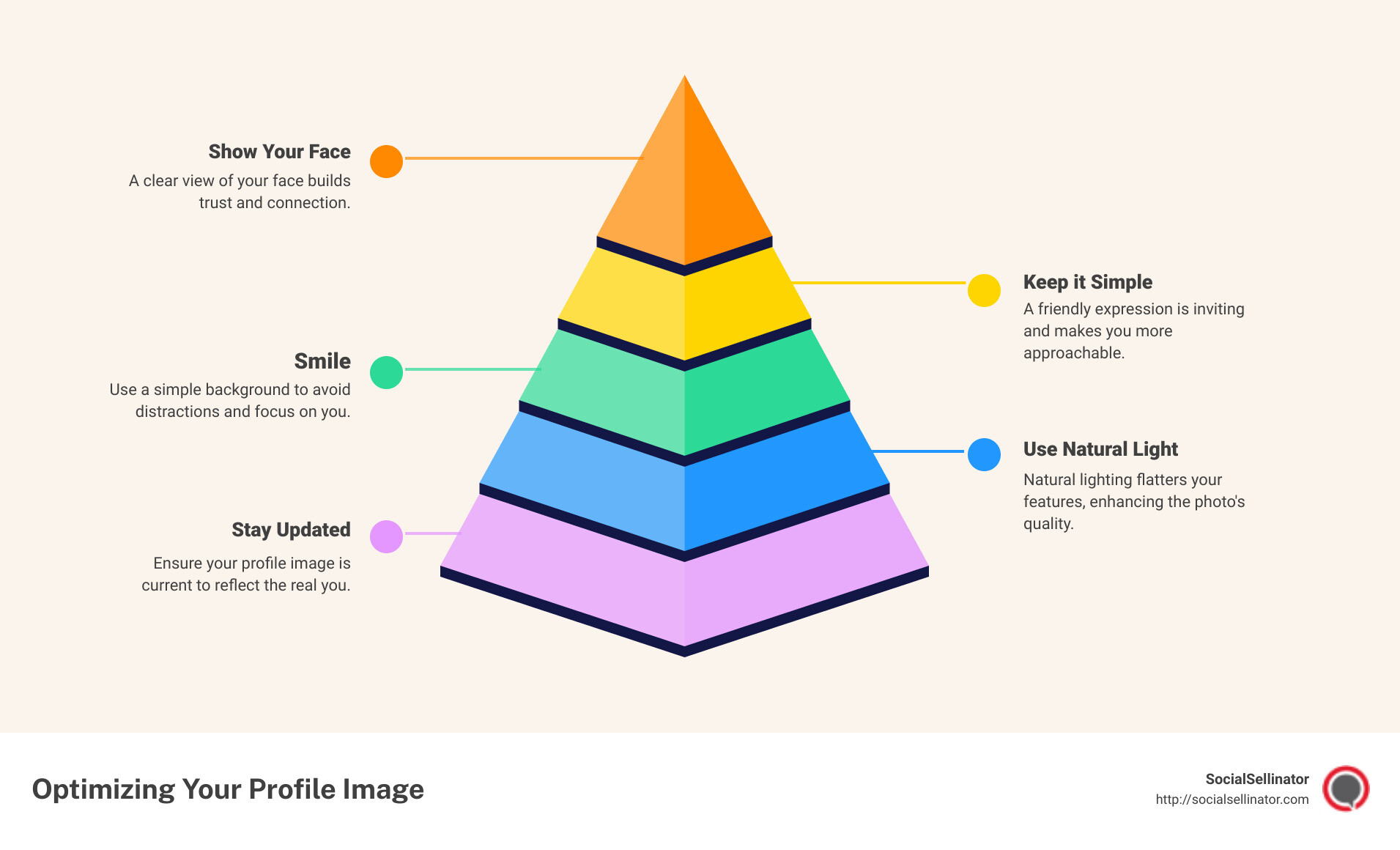
Quick Guide to Optimizing Your Profile Image:
- Show Your Face: A clear view of your face helps people who know you recognize you.
- Keep it Simple: Use a simple background to avoid distractions.
- Smile: A friendly expression is inviting.
- Use Natural Light: Natural lighting flatters your features.
- Stay Updated: Ensure your profile image is current.
Creating the right first impression online is as critical as the handshake you offer in a physical meeting. The profile image you choose sets the tone for how others perceive you in the digital space. It’s more than just a picture; it’s your digital identity, a visual representation of who you are or what your brand stands for. Whether you’re on a social networking site like Facebook, a professional platform like LinkedIn, or an online forum like Reddit, your profile image is often the first thing people notice. This makes it a powerful tool to express your personal or professional brand.
Selecting the perfect profile image isn’t just about picking a photo where you look good. It’s about communicating authenticity, professionalism, and approachability. The right image can open doors by making people want to learn more about you, connect with you, and engage in digital conversations. It can define your digital persona, influence perception, and, importantly, make you memorable in the vast sea of online profiles.
In the age of digital interactions, your profile picture is a cornerstone of your online presence. In this guide, we’ll uncover how to choose, create, and optimize your profile image to make sure it works hard for you, creating lasting and positive first impressions.
Understanding Profile Images
Definition
A profile image is a photograph or graphic used on social media, professional networks, forums, and other online platforms to represent an individual or an entity. It’s the visual “face” you show to the digital world, acting as a stand-in for you when you’re not physically present.
Importance
The significance of a profile image cannot be overstated. It’s not just a picture; it’s a powerful communication tool. Here’s why:
- First Impressions Matter: Your profile image is often the first thing people see. A well-chosen image can make a strong first impression, positively influencing how others perceive you online.
- Identity Verification: When digital interactions are commonplace, a profile image can help make interactions feel more personal and trustworthy, but a photo alone does not verify a person’s identity.
- Professional Profiles: On platforms like LinkedIn, choose a photo that helps contacts recognize you.
- Social Connectivity: For social media platforms, a profile image helps friends and followers to quickly identify and connect with you, enhancing your social interactions.
- Branding: For businesses or personal brands, a profile image is a critical component of your brand identity, helping to convey your brand’s personality and values.
Your profile image is a key part of your digital handshake. It’s how you introduce yourself to the world online, bridging the gap between the digital and the physical.
As we move forward in this guide, your choice of a profile image is a reflection of who you are and how you want to be perceived. Whether you’re aiming for a professional, friendly, or creative vibe, your image should align with your goals and the message you want to send to the world.
In the next section, we’ll explore how to choose a good profile picture that aligns with these objectives, ensuring that your digital first impression is a lasting one.
How to Choose a Good Profile Picture
Choosing the right profile picture can feel like a small decision, but it plays a major role in how you’re perceived online. Whether for a social media profile, a professional network like LinkedIn, or any platform where you have a digital presence, the right image can set the tone for your interactions. Here’s how to select a profile picture that makes the right impression.
Show Face
Your face is your identity. It’s how people recognize you. A good profile picture should clearly show your face, with your eyes looking towards the camera. This creates a feeling of direct engagement with those viewing your profile. It’s like making eye contact in real life; it builds a connection.
Frame Yourself
Centering yourself in the frame is key. You want to be the focal point of the picture. Ideally, aim for a head-and-shoulders shot. This framing is close enough to be personal but still professional. It ensures your face is visible even in thumbnail views.
Smile
A smile can transform your profile picture from okay to great. It’s welcoming and makes you appear approachable. A genuine smile can convey confidence and friendliness, qualities that are attractive in both personal and professional contexts.
Contrasting Colors
Use contrasting colors to make your profile picture stand out. If your picture has a lot of light colors, wear something darker, or vice versa. This contrast makes the image more eye-catching and ensures you don’t blend into the background.
Simple Background
Keep the background simple. You want the focus on you, not on what’s behind you. A cluttered or busy background can distract from your face. A plain or blurred background ensures that viewers’ attention remains on you.
Branding
For professionals and businesses, aligning your profile picture with your brand is essential. If you have a company logo or specific brand colors, consider incorporating them. This helps in creating a cohesive online presence that’s easily recognizable across platforms.
Consistency
Be consistent across different platforms. Using the same profile picture on all your social media accounts makes it easier for people to recognize you. This consistency aids in building your personal or professional brand, making you more memorable.
Choosing a good profile picture isn’t just about picking a photo where you look good. It’s about conveying a message, making a connection, and presenting yourself in the best light possible. Keep these tips in mind, and you’ll have a profile picture that not only looks great but also aligns with your online identity goals.
Moving forward, we’ll discuss how to create your personal profile picture, focusing on aspects like natural lighting and the best angles to ensure your chosen image is as flattering and effective as possible.
Creating Your Personal Profile Picture
Creating a personal profile picture isn’t just about snapping a quick photo. It’s about crafting an image that represents you at your best. Here’s how you can achieve a profile picture that stands out.
Natural Lighting
Why it matters: Natural lighting can improve the quality of your photo, but it varies with conditions. Try soft daylight, then check the photo for shadows and unwanted color casts.
How to use it: Try to take your photo during the day when there’s plenty of sunlight. Position yourself so that the light falls onto your face, ideally in front of a window. Avoid direct sunlight, as it can cause harsh shadows.
Best Angle
Why it matters: Your photo’s angle can affect how your facial features are perceived. Finding your best angle can make your features appear more balanced and flattering.
How to do it: Take several photos from different angles to find which one looks best. Generally, slightly tilting your head or holding the camera a bit above eye level can result in a more flattering shot.
Retouching
A word of caution: While it’s tempting to retouch your photo to perfection, overdoing it can make your picture look unnatural.
How to retouch wisely: Use retouching apps to make subtle adjustments. Perhaps remove a blemish or adjust the lighting a bit, but keep changes minimal. The goal is to still look like yourself.
Filters
Why to be cautious: Filters can change the mood and feel of your photo, but they can also distort reality.
How to use filters: If you decide to use a filter, choose one that enhances your photo without drastically changing how you look. Aim for filters that improve brightness and contrast rather than those that alter your appearance.
Brightness and Contrast
Why it matters: Proper brightness and contrast can make your photo look clearer and more vivid.
How to adjust: Use photo editing tools to slightly increase the brightness and contrast, making sure your face is well-lit and features are discernible.
Frame
Why it matters: How you frame your photo can affect its overall impact. A good frame can draw attention to your face and help you stand out.
How to frame: Ensure your face is centered and occupies a good portion of the frame. Leave some space around the edges, but not too much. A close-up shot often works best for profile pictures.
PFP Maker
Why consider using one: PFP makers are tools designed to help you create professional-looking profile pictures without needing expert photography skills.
How to use: Choose a PFP maker that offers customization options that suit your needs. Look for features like background removal, lighting adjustments, and easy-to-use retouching tools.
By following these steps, you’ll be able to create a personal profile picture that not only looks great but also captures your essence. The goal is to present a version of yourself that’s both authentic and professionally appealing. Keep experimenting until you find the perfect combination of elements that work for you.
Common Mistakes to Avoid
When it comes to selecting the perfect profile image, there are a few pitfalls that can easily detract from your online presence. Here are some common mistakes you should steer clear of:
Over-editing: While it’s tempting to use filters and editing tools to enhance your photo, going overboard can lead to an unnatural look. Keep edits subtle if you want the photo to resemble you in person. Stick to minimal adjustments that highlight your best features without altering your appearance too much.
Irrelevant backgrounds: Your background tells a story as much as your foreground. A cluttered or irrelevant background can distract viewers from your face. Opt for simple, unobtrusive backgrounds that don’t steal the spotlight. Whether you choose a solid color or a natural setting, make sure it complements rather than competes with your image.
Poor lighting: Lighting can make or break a photo. Poorly lit images can result in shadows that obscure your face or create an unflattering appearance. Natural lighting is your best friend. Aim for soft, diffused light that evenly illuminates your face, bringing out your features without harsh shadows or overexposure.
Outdated photos: Your profile image should reflect how you currently look. An outdated photo can lead to confusion and diminish your credibility, especially in professional settings. Make it a habit to update your profile picture every year or whenever your appearance changes significantly (like a new hairstyle).
Misrepresentative images: Choose a photo that accurately represents you and the image you want to project. For instance, if you’re a professional, opt for a picture that conveys professionalism. Avoid using images that could send the wrong message about who you are or what you stand for.
Before uploading, check whether the image is recognizable and conveys the impression you intend. Your profile picture is a key part of your digital identity. Make it count!
Next, we’ll explore some creative alternatives to traditional profile pictures for those looking to stand out from the crowd.
Alternatives to Traditional Profile Pictures
In a digital world where standing out is key, here are some creative alternatives to the traditional profile picture. Whether you’re seeking a bit of anonymity or just want to flex your creative muscles, these options can add a unique touch to your online presence.
Avatars
Avatars are digital representations that can range from cartoonish versions of yourself to completely imaginative characters. They allow for a high degree of personalization and can represent you without showing your face. An avatar does not make the rest of your profile anonymous.
Display Picture (DP)
Though often used interchangeably with profile pictures, DPs can sometimes take a broader definition, incorporating any image that represents you on a platform. This could be a personal logo, a favorite quote on a simple background, or even a piece of abstract art that speaks to you.
User Icons
User icons are simple, symbolic images used to represent a user. They can be as straightforward as a silhouette or a generic human figure. A simple icon is an option if you prefer minimalism or prefer not to display a photograph.
Silhouettes
A silhouette is a solid, single-color representation of a shape, in this case typically a person’s profile. This option offers an air of mystery and simplicity, making it a classy alternative to the traditional headshot. It’s a subtle yet stylish way to mark your presence.
Abstract Images
For those who think outside the box, abstract images can serve as a fascinating profile image choice. Whether it’s a burst of colors, geometric patterns, or an artistic blur, abstract images can convey your creative side or emotional state without revealing your physical appearance.

Each of these alternatives offers a unique way to express yourself and lets you choose whether to show your face. They can make your profile stand out in a sea of traditional headshots, showing your creativity or your brand’s identity in a fresh light. Review your profile details and privacy settings separately.
As we wrap up this section, your choice of profile image, traditional or alternative, plays a major role in shaping your digital identity. It’s the first step towards making a memorable impression online. Next, we’ll tackle some of the most frequently asked questions about profile images to help you navigate this essential aspect of your online presence more confidently.
Frequently Asked Questions about Profile Images
Choosing profile images can be tricky. Here are some common questions to help you understand and master this important part of your online identity.
What is a profile image?
A profile image is a picture that represents you on digital platforms. It’s like a virtual handshake: the first thing people see when they come across your profile online. Whether it’s on social media, a company website, or a forum, your profile image introduces you before you even say a word.
How do I make a personal profile picture?
Creating a personal profile picture that captures your essence while looking professional isn’t as hard as it seems. Follow these simple steps:
- Choose the right photo: Pick a photo where your face is clearly visible. A genuine smile can make you seem approachable and friendly.
- Mind the lighting: Natural lighting works best. Stand facing a window to ensure your features are well-lit without harsh shadows.
- Keep it simple: Use a simple background that doesn’t distract from your face. A plain wall or a non-busy outdoor setting works great.
- Dress the part: Wear something that reflects your professional or personal brand. Solid colors often work better than busy patterns.
- Edit wisely: Simple edits like adjusting the brightness or cropping the photo to the right size can make a big difference. Avoid over-editing to ensure you still look like yourself.
What is another name for a profile picture?
Profile pictures are known by several names, depending on the platform and the user’s preference. Some common alternatives include:
- Avatar: Often used when the image is a digital or cartoon representation rather than an actual photograph.
- Display Picture (DP): Commonly used terminology on various social media platforms.
- User Icon: A small image representing an account.
- PFP (Profile Picture): A shorthand that’s become popular in online conversations and forums.
Each term essentially means the same thing but is used differently based on context and personal preference.
Your profile image is more than just a photo. It’s a part of your digital identity that can influence how people perceive you online. Choosing the right image can help you make a positive and lasting impression.
Keep in mind the importance of a well-chosen profile image in enhancing your online presence and making meaningful connections in the digital world. With these tips and insights, you’re well-equipped to select a profile image that truly represents you.
Conclusion
Your profile image is often the first impression you make on others online. Whether on social media, professional networks, or any other digital platform, this visual representation can speak volumes about you before a single word is exchanged. It’s not just a photo; it’s a key part of your digital identity that can significantly influence how people perceive you, your professionalism, and your personality.
Choosing the right profile image is more than a matter of aesthetics; it’s about making a conscious decision to present yourself in the best possible light. A well-chosen image can help you stand out, convey professionalism, and even impact the success of your digital interactions and opportunities. It’s an essential step in crafting a compelling online presence that aligns with your personal or professional brand.
At SocialSellinator, we understand the power of a perfect profile image. It’s about more than looking good; it’s about communicating your brand’s message, your professional ethos, or your personal brand’s uniqueness. Your profile image can be a key factor in optimizing your social media profiles, making connections that matter, and even in the success of your digital marketing efforts.
In summary, never underestimate the importance of your profile image. Choose a picture that represents you and check how it looks at the size visitors will see. Explore our Social Media Cheat Sheet.
In the digital world, your profile image is your handshake, your business card, and your personal brand all rolled into one. Make it count.