
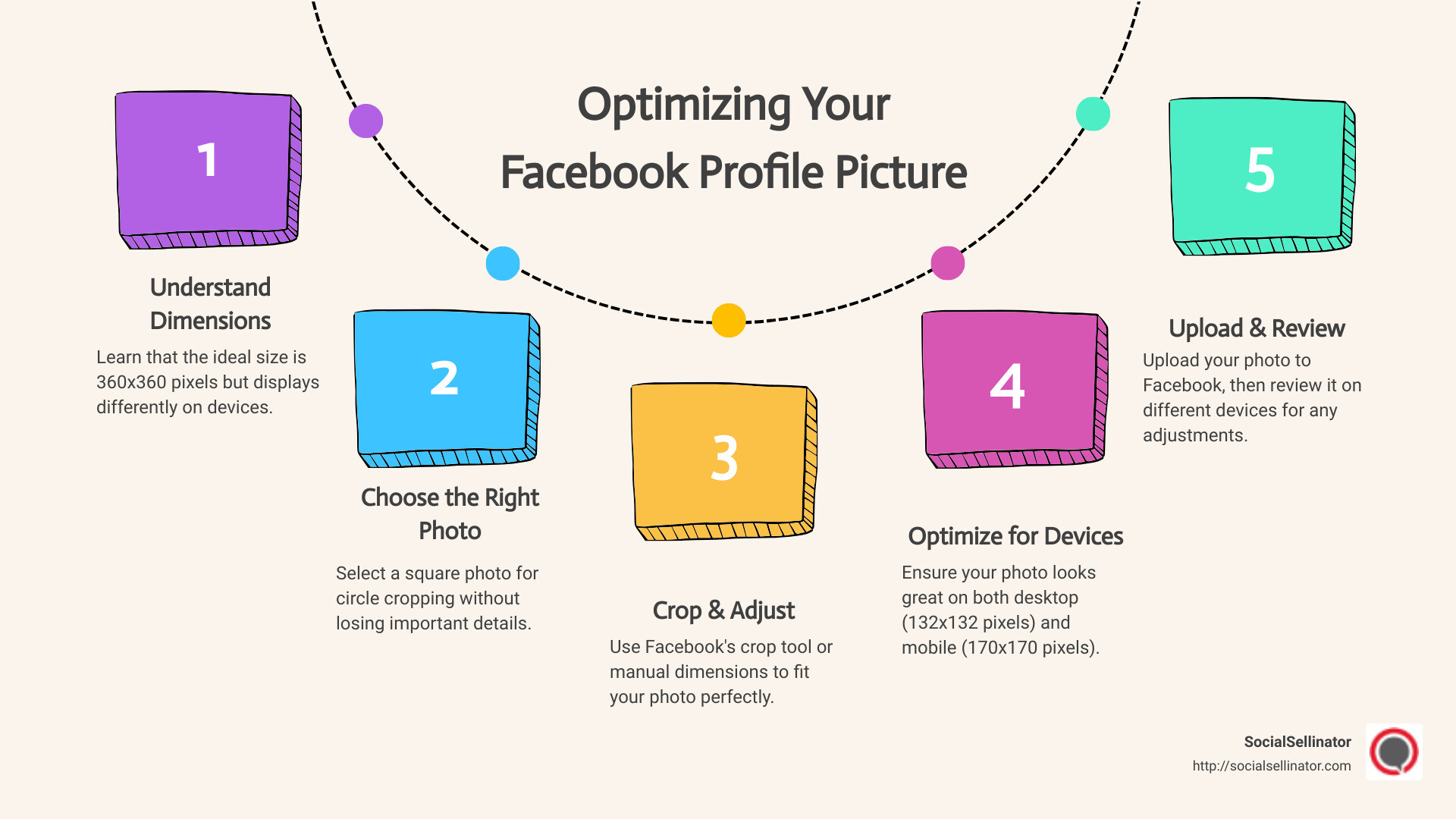
Quick Guide to Facebook Profile Picture Size: The ideal size for a Facebook profile picture is 360×360 pixels. On desktop, it displays at 132×132 pixels, and on mobile, it appears at 170×170 pixels. The minimum upload size is 180×180 pixels. Square photos will be circle cropped in your profile display and in comments.
Social media, especially Facebook, is like a digital front porch. It’s where first impressions are made. Whether you’re a marketer at a small to midsize business or simply polishing your personal profile, getting your Facebook profile picture size right is crucial. It’s not just about fitting a square into a circle. It’s about optimization, making sure your face or logo is clear, and ensuring your image doesn’t get awkwardly cropped.
Why does this matter? A crisp, clear profile picture can build trust, enhance recognition, and improve engagement. It’s essential not just for personal profiles but also for business pages seeking to make a professional impression on clients and customers.
Optimizing your Facebook profile picture isn’t just about picking a good photo. It involves understanding the nuances of dimensions, pixels, and aspect ratios to ensure your image looks its best on both desktop and mobile devices. In this guide, we’ll dive deep into these aspects, providing insights and tips to help you navigate the size specifications with ease.
Understanding Facebook Profile Picture Sizes
When it comes to facebook profile picture size, there are a few key terms and concepts you need to get familiar with: Dimensions, Pixels, Aspect Ratio, and Circle Crop. Let’s break these down in simple terms to help you make your profile picture look just right.
Dimensions and Pixels
First off, the dimensions of your Facebook profile picture refer to the width and height of the image, which are measured in pixels. A pixel is the smallest unit of a digital image or graphic that can be displayed and represented on a digital display device. For Facebook, the ideal upload size of a profile picture is 360 x 360 pixels. However, it’s displayed at 170×170 pixels on desktop, 128×128 pixels on smartphones, and 36×36 pixels for older phones.
Aspect Ratio
The aspect ratio is the ratio of the width to the height of an image. For a Facebook profile picture, the aspect ratio is 1:1, meaning the width and height are equal, creating a square. However, while the upload is square, Facebook will crop it to a circle in most views. This leads us to our next point.
Circle Crop
When you upload your square image, Facebook crops it into a circle in most places it’s displayed. This means the corners of your image won’t be visible. When preparing your image, you need to ensure that any important elements, like your face or logo, are centered and not too close to the edges. This way, they won’t be cut off when Facebook applies the circle crop.
Here’s a quick tip: Imagine drawing a smaller square inside your square image. Keep all the important elements within that inner square to ensure they’re safe from the circle crop.
To sum up, when selecting or preparing your Facebook profile picture, aim for a 360×360 pixel square image with a 1:1 aspect ratio. Make sure any crucial elements of the picture are centered to avoid being clipped by the circle crop. Understanding these specifications will help you choose an image that looks great on both desktop and mobile, ensuring you make a strong first impression whether you’re using Facebook for personal profiles or business pages.
Next, we’ll move on to how you can fit your picture perfectly, including tools and techniques for cropping and adjusting your images to meet Facebook’s requirements.
How to Fit Your Picture Perfectly
Getting your Facebook profile picture just right might seem like a small detail, but it’s your digital handshake. First impressions count, so let’s make it perfect.
Crop Tool
The crop tool is your best friend when it comes to fitting your picture perfectly for Facebook. Most photo editing software, including the ones on your phone, has this tool. The key is to select the 1:1 aspect ratio option, which gives you a square. Since Facebook profile pictures appear as circles in posts and comments, centering the main elements of your image in this square ensures nothing important gets cut off.
Aspect Ratio
The aspect ratio is essentially the shape of your image. For Facebook profile pictures, as mentioned, a 1:1 aspect ratio (square) is what you’re aiming for. But remember, what shows up is a circle cropped from this square. Picture a square piece of paper. Now, imagine drawing a circle that touches the middle of each side of the square. Everything inside the circle is what people will see.
Manual Dimensions
Sometimes, you need to get technical. If you’re using a tool that allows for manual dimension input, remember the ideal facebook profile picture size: at least 180px by 180px for uploading. However, for sharpness, going up to 360px by 360px is recommended. This ensures your image remains clear and crisp, even on high-resolution screens.
Adobe Express
Adobe Express is a handy tool for those who want to ensure their pictures fit perfectly without diving too deeply into manual adjustments. It offers pre-set templates designed to meet Facebook’s image size requirements. Simply choose a Facebook template, and it will automatically set your image to the correct dimensions. You can then use the crop tool within Adobe Express to adjust your image, making sure the important elements are centered for that perfect circle crop.
The goal is to have an image that represents you or your brand the best way possible. Whether it’s a smiling selfie, a logo, or any other image, following these guidelines ensures it looks great in that all-important profile spot on Facebook.
Now that you know how to fit your picture perfectly, let’s move on to the steps for uploading full pictures on Facebook, ensuring your profile looks exactly as you want it to.
Uploading Full Pictures on Facebook
Uploading a photo to your Facebook profile might seem straightforward, but ensuring it looks just right requires a bit more attention. Here’s a simple guide to help you upload full pictures on Facebook, focusing on the upload steps, profile selection, and image adjustment.
Upload Steps
- Log In: Start by logging into your Facebook account.
- Go to Your Profile: Click on your name or profile picture at the top of the Facebook page to go to your profile.
- Edit Profile Picture: Hover over your current profile picture and click on the camera icon that appears, then select “Update Profile Picture.”
- Choose Your Picture: You can either select a photo you’ve already uploaded to Facebook or upload a new one from your device. To upload a new picture, click “Upload Photo,” then navigate to the image file on your device.
Profile Selection
- Selecting the Right Image: Choose an image that represents you or your brand well. This photo will be seen across Facebook, so pick something recognizable and professional.
- Consider the Crop: Facebook will crop your photo into a circle in some views, so make sure the important parts of your image are centered to look good in both square and circle crops.
Image Adjustment
Once you’ve uploaded your photo, you might need to adjust it to fit the facebook profile picture size:
- Drag to Reposition: Click and drag your photo to reposition it within the crop frame.
- Use Zoom: If your photo is larger than the minimum size (180×180 pixels), you can use the zoom slider to zoom in or out. This is helpful if you’re trying to fit a particular part of a larger image into the profile picture space.
- Crop if Necessary: If your photo isn’t the right dimensions or you want to focus on a specific part of the image, use a photo editing tool to crop it before uploading. Aim for a square aspect ratio (1:1) and remember that Facebook prefers images that are at least 360×360 pixels for profile pictures.
After adjusting your photo, click “Save,” and your new profile picture will be set. It might take a few minutes for the change to appear across Facebook.
Remember:
- High-Resolution Images: Always choose the highest resolution possible to avoid pixelation. Facebook compresses images, so starting with a high-quality photo ensures it still looks good after upload.
- Aspect Ratio: For profile pictures, a 1:1 aspect ratio is ideal. For cover photos, the recommended dimension is 851×315 pixels, with a minimum width of 720 pixels.
- File Type: JPG format is typically best for photos, while PNG is preferred for images with logos or text due to its lossless compression.
By following these steps and considerations, you can ensure your Facebook profile picture looks exactly as you want it to, representing you or your brand in the best light.
Next, we’ll explore the optimal image sizes for Facebook engagement to help your photos stand out in your friends’ and followers’ feeds.
Optimal Image Sizes for Facebook Engagement
When you’re posting on Facebook, you want your images to catch the eye of your audience. Whether you’re sharing a snapshot from your weekend, a portrait, or a promotional graphic, knowing the recommended sizes for each image type can significantly impact how your content is received. Let’s dive into the specifics to ensure your images are perfectly primed for engagement.
Recommended Sizes
Landscape (Horizontal) Images: Aim for a size of 1200px by 630px. This size is ideal for sharing news, blog post images, or landscapes. It’s wide enough to be engaging without being cropped awkwardly in the feed.
Portrait (Vertical) Images: The sweet spot is 1080px by 1350px. Especially popular for personal shares and stories, this size is perfect for photos where you want to capture more detail vertically.
Square Images: Stick to a 1080px by 1080px size. Square images work well for profile photos, album covers, or product shots where you want equal visibility on all sides.
Image Quality
Resolution is Key: Always aim for the highest resolution possible within the recommended size limits. High-quality images are more engaging and less likely to be scrolled past.
File Type Matters: For most images, JPG format offers a good balance between quality and file size. However, if your image includes text or a logo, consider using PNG to preserve clarity.
Why These Sizes Matter
Facebook’s algorithm and platform design favor images that are optimized for its feeds and spaces. Using the recommended sizes ensures that your images display correctly without unwanted cropping or distortion, making them more likely to engage viewers. Additionally, high-quality images can convey professionalism and attention to detail, enhancing your personal or brand image.
A Practical Tip: Before posting, preview your image in both mobile and desktop views. Since the majority of Facebook users access the platform via mobile devices, it’s crucial that your images look great on smaller screens too.
By adhering to these guidelines for landscape, portrait, and square images, you’ll be better positioned to grab attention, encourage likes, comments, and shares, and ultimately, foster greater engagement on Facebook. The goal is to make your images as eye-catching and appealing as possible to stand out in a crowded feed.
Next, we’ll discuss adjusting your Facebook cover photo for personal profiles, another critical aspect of your Facebook presence that can influence engagement.
Adjusting Facebook Cover Photo for Personal Profiles
Adjusting your Facebook cover photo is like setting the stage for your profile. It’s the first big picture people see when they visit your page, so you want it to look good on all devices. Let’s dive into how to make your cover photo shine.
Cover Photo Dimensions
The ideal size for your Facebook cover photo is 851 pixels wide by 315 pixels tall for desktops. But, what looks good on a desktop might not look the same on a mobile device.
Desktop vs Mobile
On mobile devices, the dimensions shift slightly to 640 pixels wide by 360 pixels tall. This means some parts of your cover photo might get cropped out or not be visible on mobile devices. To avoid important elements of your photo being cut off, aim to place the main content or text in the center of the image.
PNG Format
If your cover photo includes text or a logo, PNG format is the way to go. PNG files are clearer than JPGs, especially for images with text, ensuring your cover photo looks crisp and legible on all screens.
Aspect Ratio
The aspect ratio for a Facebook cover photo is roughly 2.7:1 (desktop) and 1.78:1 (mobile). This is a crucial point to consider because an incorrect aspect ratio can lead to your image being stretched or squished, ruining its appearance. To avoid this, use an image that naturally fits these aspect ratios or be prepared to crop your photo accordingly.
Tips for a Perfect Cover Photo:
- Center your content: Keep the essential elements of your photo in the center to ensure they’re visible on all devices.
- Test on multiple devices: Before finalizing your cover photo, check how it looks on both desktop and mobile to ensure it’s displaying correctly.
- Use high-resolution images: This ensures your cover photo looks sharp and professional across all devices.
- Mind the profile picture: Your profile picture overlaps the cover photo on the bottom left, so make sure it’s not covering any important parts of your cover photo.
Adjusting your Facebook cover photo isn’t just about making it fit; it’s about making a strong first impression. By following these guidelines on cover photo dimensions, desktop vs mobile considerations, using PNG format for clarity, and understanding the aspect ratio, you’re well on your way to creating an engaging and visually appealing Facebook profile.
Next, we’ll tackle some of the most frequently asked questions about Facebook profile picture sizes, providing you with quick, actionable answers to help you optimize your Facebook presence even further.
Frequently Asked Questions about Facebook Profile Picture Sizes
Navigating Facebook image sizes can be tricky, but it’s crucial for making your profile stand out. Here, we’ll dive into some common questions about Facebook profile picture sizes, cover photos, and the best image sizes to use for engagement.
How do I make my FB profile picture fit?
To ensure your FB profile picture fits perfectly within the circular frame, use the crop tool available in most photo editing software or apps. When you select your photo to upload on Facebook, you can also adjust the framing directly on the platform by dragging the photo to the desired position. The aspect ratio for profile pictures is square, so aim for a 1:1 aspect ratio. This means your photo should be as tall as it is wide. Tools like Adobe Express offer presets specifically designed for Facebook profile pictures, simplifying the process.
What is the best image size to use on Facebook?
For general posts, the optimal image size for high engagement on Facebook is 1,200 x 630 pixels. This dimension works well for both link shares and standard photo posts, providing a clear and engaging visual experience on both desktop and mobile devices. If you’re concerned about your images appearing blurry or pixelated, resizing them to these dimensions before uploading can help maintain clarity. Various online tools and software offer easy image resizing options to fit these specifications, ensuring your content looks its best.
What size is Facebook personal profile cover photo?
The ideal size for a Facebook personal profile cover photo is 851 x 315 pixels. However, it’s important to note that on mobile devices, the dimensions adjust slightly to 640 pixels wide by 360 pixels tall. To ensure your cover photo looks great on all devices, consider using a PNG file format for higher quality, especially if your image includes text or a logo. Keep critical elements of your design centered to avoid cropping issues when viewed on different platforms. Again, tools like Adobe Express can be handy, offering Facebook cover presets that automatically adjust your image to fit these dimensions.
Whether it’s your profile picture or cover photo, the key is to use high-quality images that represent you or your brand effectively. By adhering to these recommended sizes and using the right tools for editing and resizing, you can ensure your Facebook profile looks professional and captures the attention of your audience.
Having covered these essential FAQs on Facebook profile picture sizes, let’s move on to explore how you can maximize visibility and engagement through optimal image sizing and other digital marketing solutions offered by SocialSellinator.
Conclusion
Visibility and engagement are the cornerstones of building a strong online presence. Our journey through understanding the ins and outs of Facebook profile picture sizes highlights just one piece of the puzzle in achieving this goal. Whether it’s your personal profile or your brand’s Facebook page, getting the dimensions right can significantly impact how your audience perceives you.
But it doesn’t stop there. The right image size, particularly the facebook profile picture size, is crucial not just for aesthetics, but for ensuring your audience engages with your content. A clear, well-positioned profile picture can make your profile more inviting, increasing the likelihood of interaction and engagement from viewers. On social media, every pixel counts towards making that critical first impression.
At SocialSellinator, we understand that managing your digital presence goes beyond just the perfect profile picture. It encompasses a comprehensive strategy that includes content creation, platform optimization, and engagement tactics, all designed to elevate your brand’s online visibility. Our digital marketing solutions are tailored to meet the unique needs of your business, ensuring that you not only look good online but also connect and interact effectively with your target audience.
The journey to optimizing your Facebook profile is a stepping stone towards a broader goal. It’s about crafting a digital identity that resonates with your audience, reflects your brand’s values, and fosters meaningful connections. And with the right tools, knowledge, and support, achieving this goal is within reach.
Let’s recap the essentials:
- Visibility: A well-sized and clear profile picture enhances your visibility on Facebook, making it easier for your audience to recognize and remember you.
- Engagement: Optimal image sizes, including your profile and cover photos, encourage more interactions from viewers, which is crucial for building relationships and fostering community.
- SocialSellinator Digital Marketing Solutions: To truly thrive online, a comprehensive strategy that goes beyond image sizing is necessary. Our services at SocialSellinator are designed to enhance your digital presence, ensuring you make the most out of every opportunity to connect with your audience.
In conclusion, while the perfect Facebook profile picture size is a great starting point, it’s the comprehensive approach to digital marketing that ultimately drives visibility and engagement. At SocialSellinator, we’re here to help you navigate this journey, providing you with the tools, knowledge, and support needed to succeed in the digital landscape.